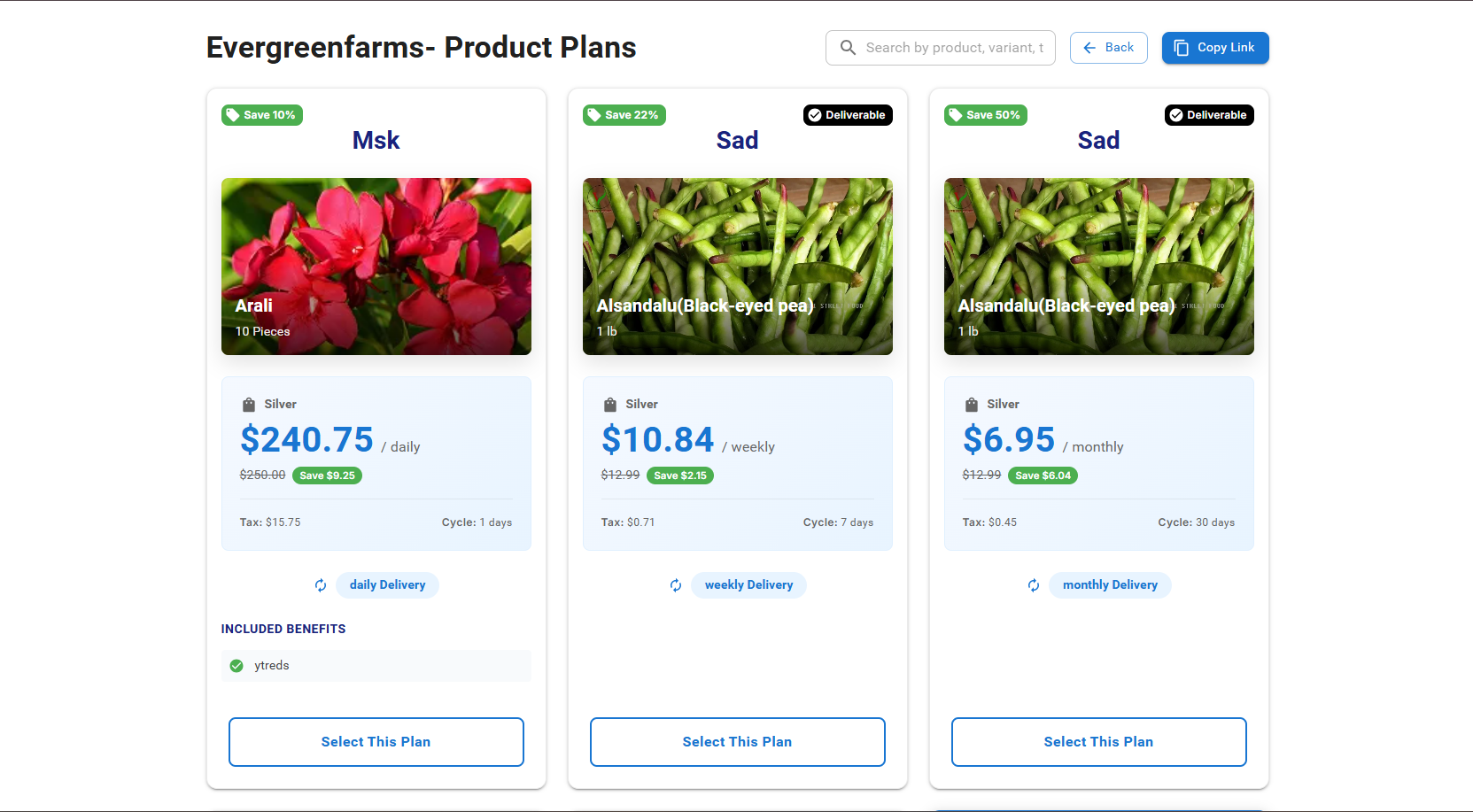
Product-plans Management
The Product-plans Management module allows you to create and manage subscription plans for your products. This guide covers how to navigate the plans dashboard, create new plans, add variants, and edit existing plans.
Key Features
- View Plans: Displays a complete list of active subscription plans with details such as Plan Title, Plan Type, Service Type, Base Price, Visits Per Year, and Status.
- Search Plans: Use the search bar to filter plans by Plan Title or Plan Type.
- Filter by Status: Toggle between Active and Inactive plans using the status filters.
- Add New Plan: Click the Add Plan button to create a new subscription plan.
-
Edit Plan: "
 " icon to modify the details of a specific plan.
Click the edit icon to modify plan details.
" icon to modify the details of a specific plan.
Click the edit icon to modify plan details.
-
Delete Plan:"
 "
icon to remove a plan. Confirm deletion when prompted.
"
icon to remove a plan. Confirm deletion when prompted.
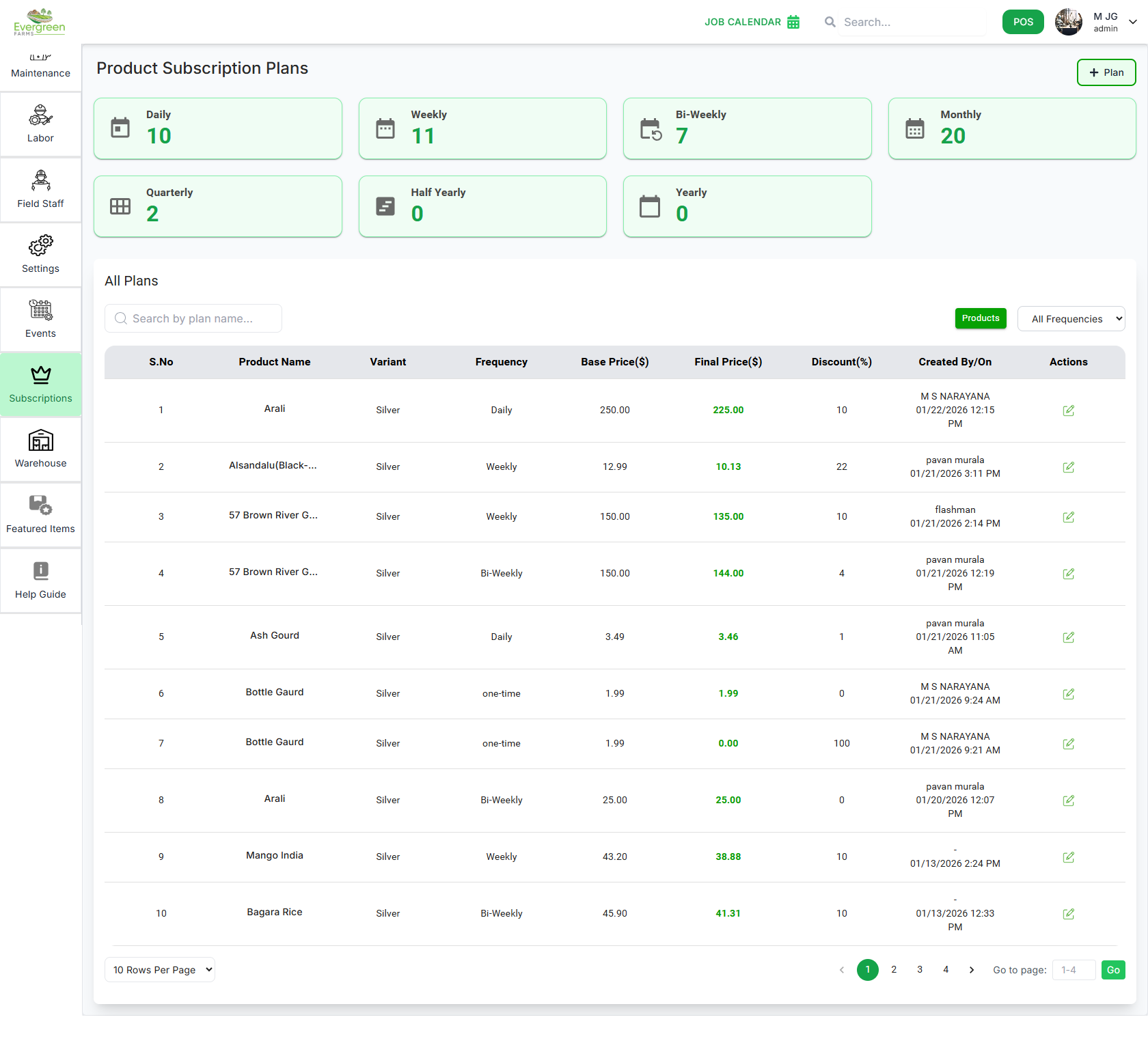
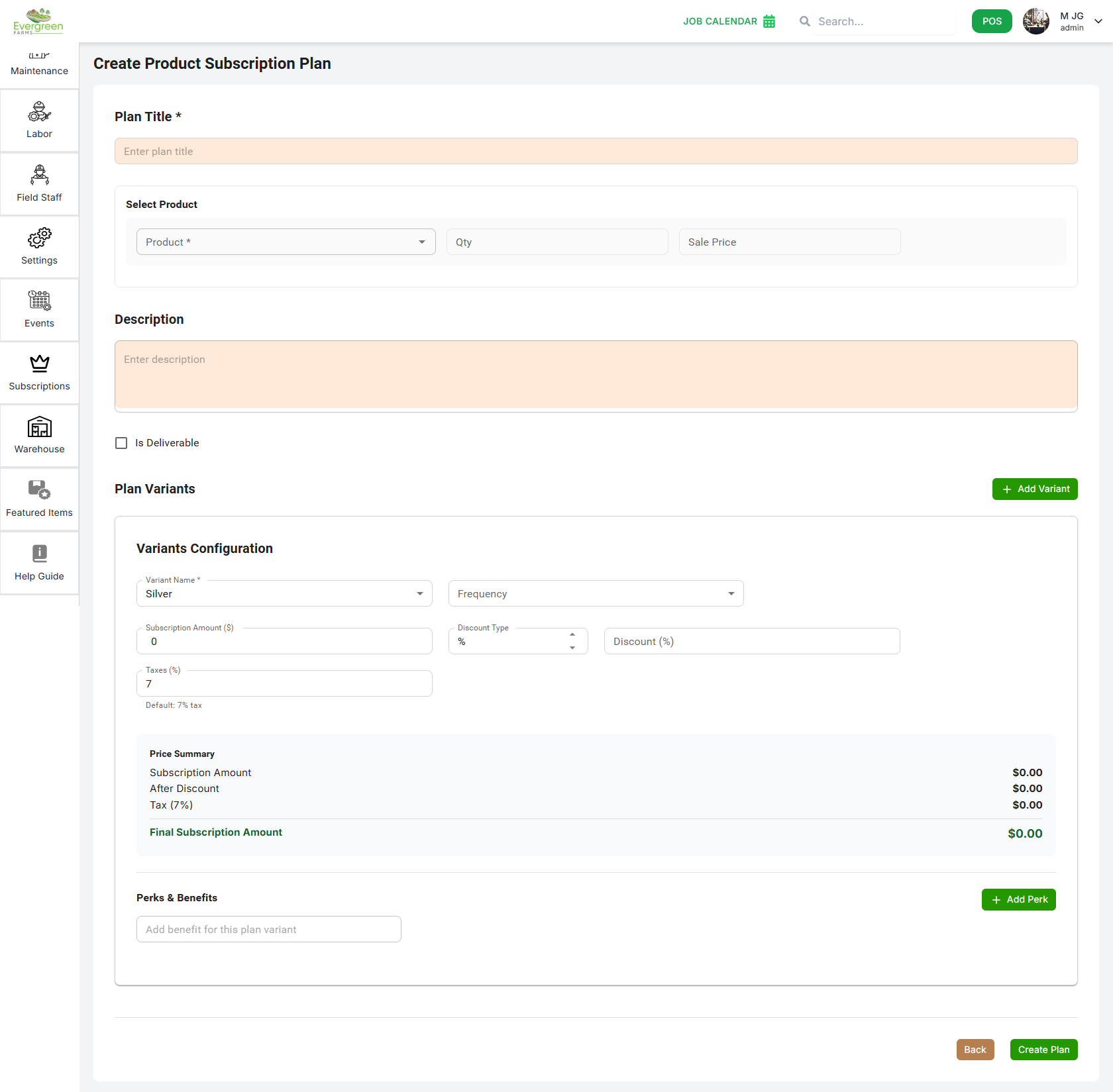
Steps to Create a Plan
- Click the Add Plan button on the Plans Dashboard.
-
Fill out the Plan Information section:
- Plan Title: Enter a name for your subscription plan.
- Select Product: Choose the product for which this plan applies.
- Qty: Specify the quantity of the product included in the plan.
- Sale Price: Specify the sale price of the product included in the plan.
- Description: Provide a brief description of the product plan.
-
Proceed to Plan Variants:
- Click the + Add Variant button to add a pricing tier (example: Silver, Gold, Diamond).
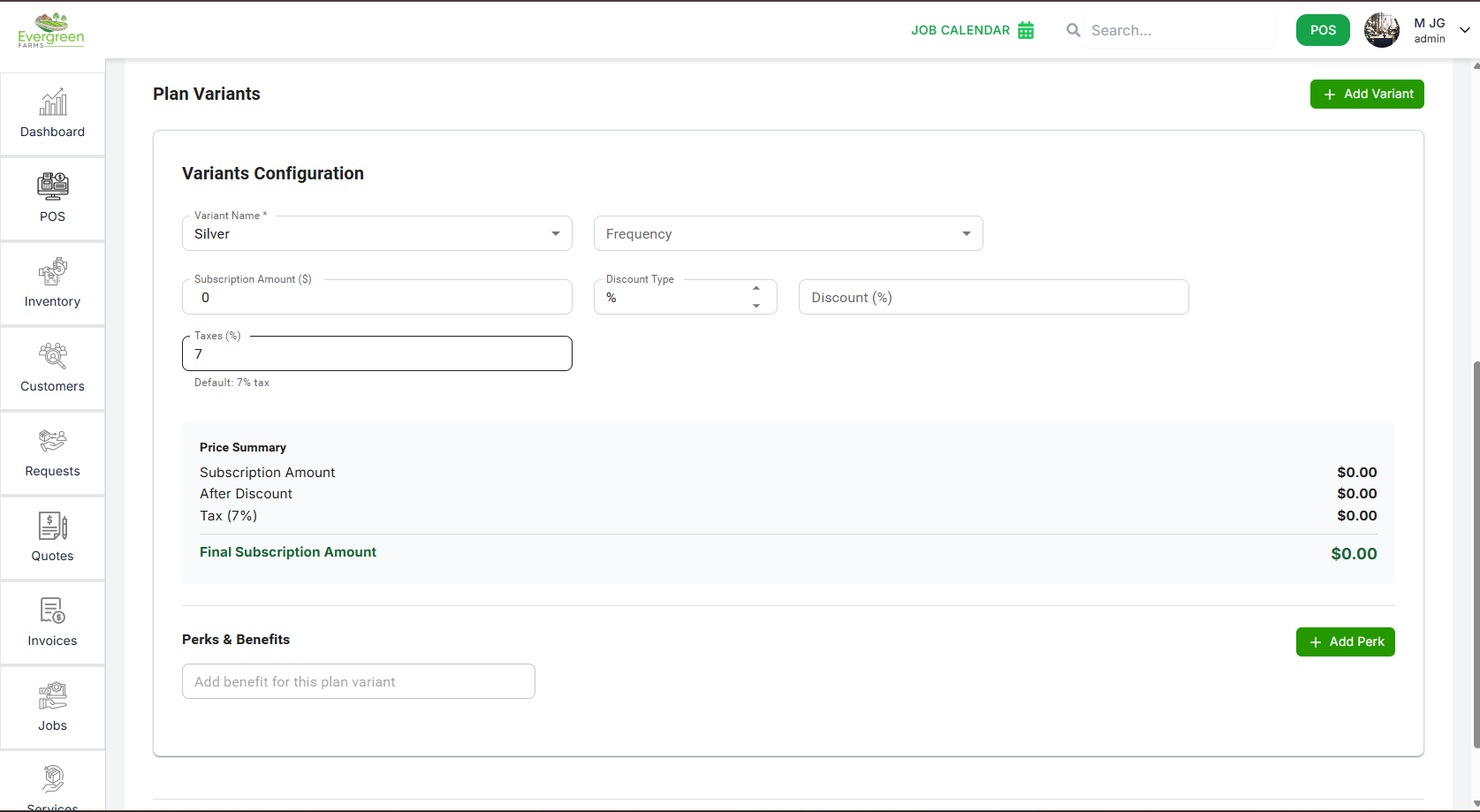
Variant Configuration
Each variant allows you to create different pricing tiers within one subscription plan. Example: Small Area, Medium Area, Large Area.
- Variant Name: Select the name of the pricing tier.
- Frequency: Select the billing frequency (one-time, daily, weekly, bi-weekly, monthly, quarterly, half-yearly, yearly).
- Subscription Amount ($): by automatic calculation, the total cost for this variant based on the selected products.
- Discount type: Choose between Percentage or Fixed Amount for any discounts applied.
- Discount: Enter the discount value based on the selected
- Payment Frequency Discounts: Optional discounts based on yearly, half-yearly, quarterly, or monthly payments.
- Taxes: by automatic calculation based on applicable tax rates.
- Perks & Benefits: Add perks or benefits (one per line) included in the plan variant.
Saving the Variant
After filling all details, click Save Variant. You can add multiple variants before creating the plan. Finally, click Create Plan to save the complete subscription plan.
The Edit Plan page allows you to update an existing plan by changing its title, modifying its service, and managing the associated plan variants. You can easily edit, delete, or add new variants based on your requirements.
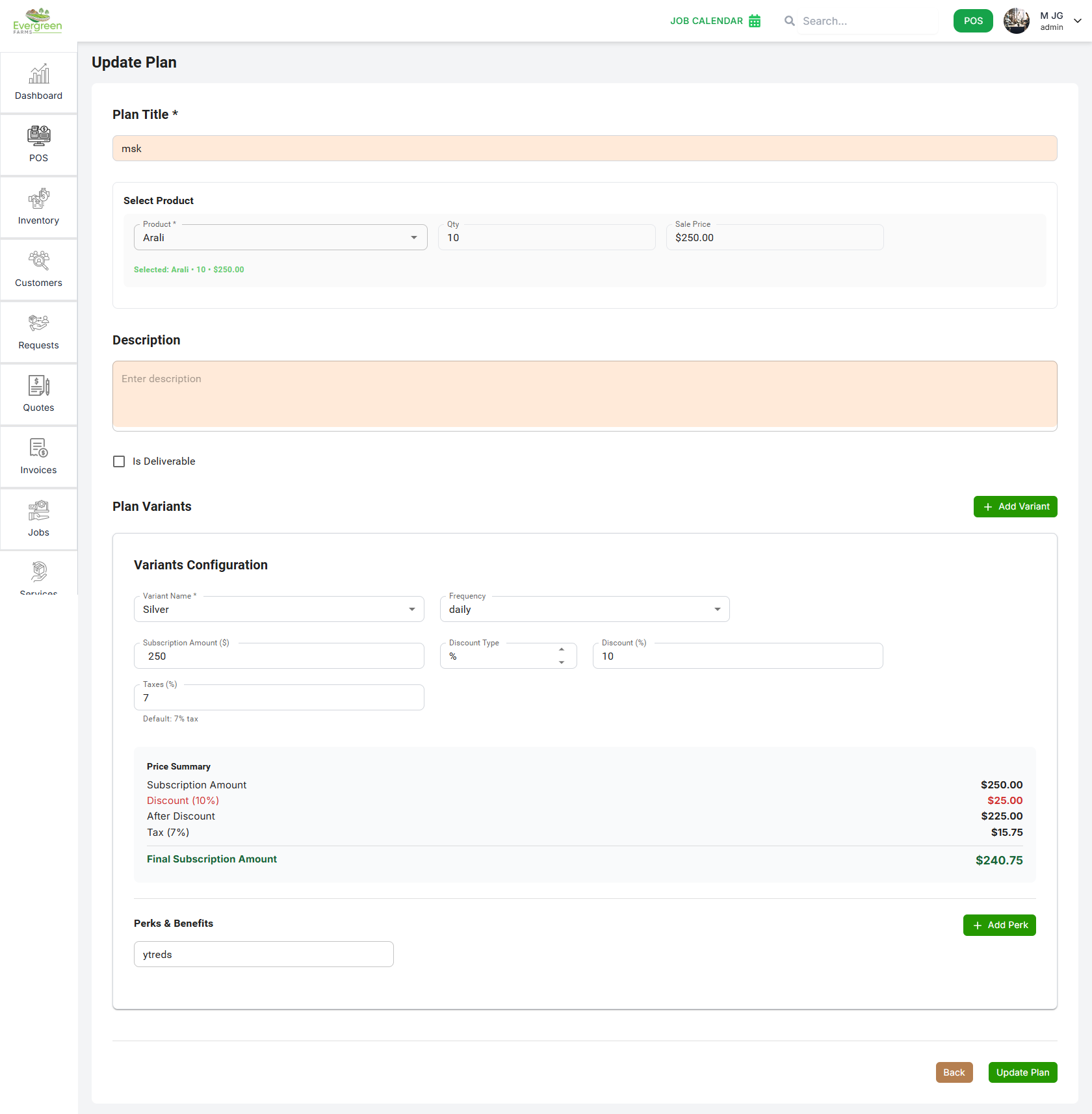
Plan Information
- Plan Title: Update the name of your subscription plan as needed.
- Select Product: Change the product associated with this plan if necessary.
- Qty: Update the quantity of the product included in the plan.
- Sale Price: Update the sale price of the product included in the plan.
- Description: Modify the description of the product plan.
Plan Variants
Each variant displays the pricing tier of the plan along with area range, perks, and status. You can:
- Edit Variant: Click the edit icon to modify visits per year, acres, pricing, discounts, monthly schedule, and perks.
- Delete Variant: Remove a variant entirely with the delete icon.
- Add Variant: Use the + Add Variant button to include new pricing tiers.
- Variant Name: Select the name of the pricing tier.
- Frequency: Select the billing frequency (one-time, daily, weekly, bi-weekly, monthly, quarterly, half-yearly, yearly).
- Subscription Amount ($): by automatic calculation, the total cost for this variant based on the selected products.
- Discount type: Choose between Percentage or Fixed Amount for any discounts applied.
- Discount: Enter the discount value based on the selected
- Payment Frequency Discounts: Optional discounts based on yearly, half-yearly, quarterly, or monthly payments.
- Taxes: by automatic calculation based on applicable tax rates.
- Perks & Benefits: Add perks or benefits (one per line) included in the plan variant.
Save Changes
After making all necessary updates, click the Update Plan button to save your changes. You can also cancel the update using the Cancel button.
Services plan
Easily create, manage, and customize subscription plans using the Plans Management module. This guide explains how to view plans, create new plans, and configure plan variants.
✅ Key Features
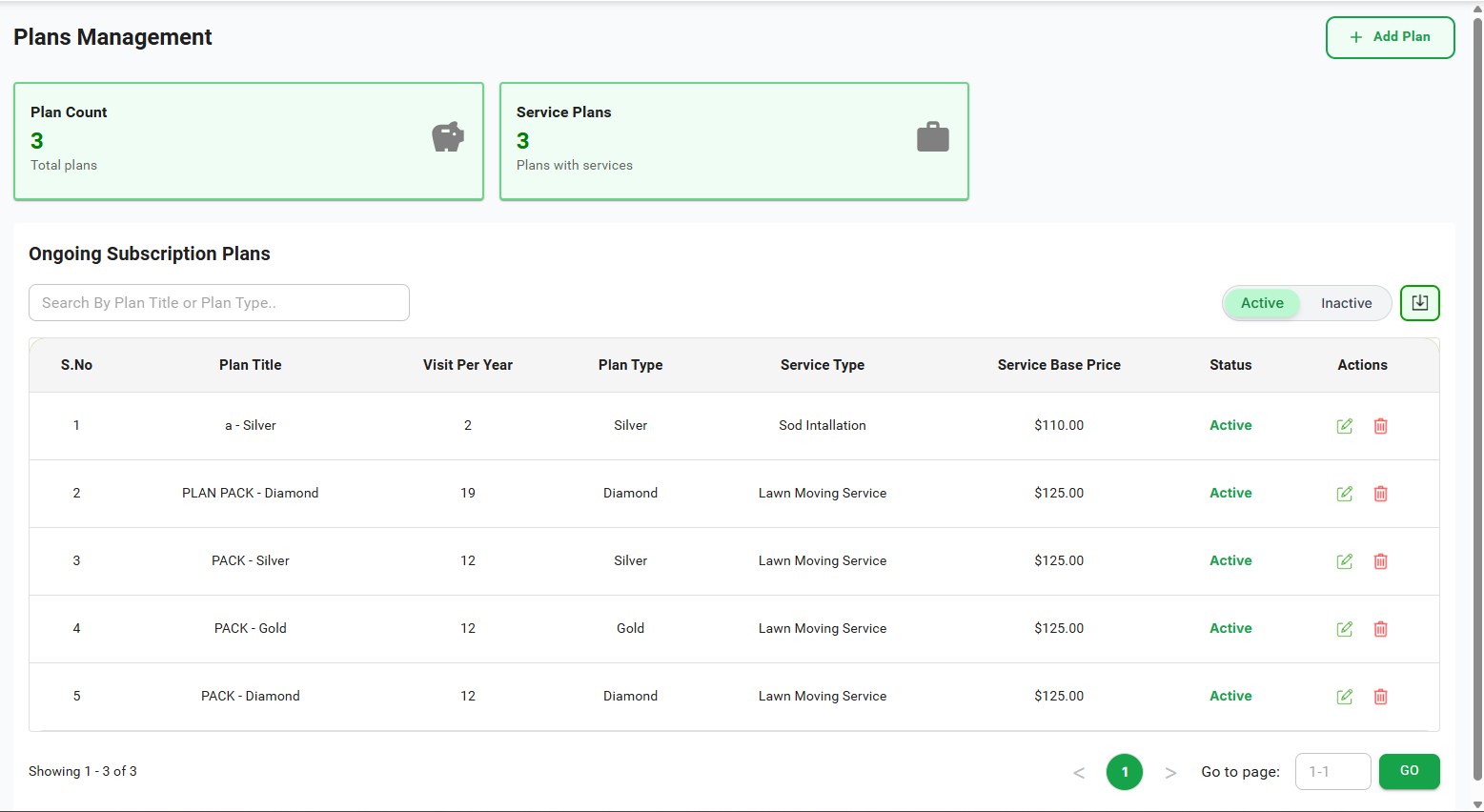
- View Plans: Displays a complete list of active subscription plans with details such as Plan Title, Plan Type, Service Type, Base Price, Visits Per Year, and Status.
- Search Plans: Use the search bar to filter plans by Plan Title or Plan Type.
- Filter by Status: Toggle between Active and Inactive plans using the status filters.
- Add New Plan: Click the Add Plan button to create a new subscription plan.
-
Edit Plan: "" icon to modify the details of a specific plan.
Click the edit icon to modify plan details.
-
Delete Plan:""
icon to remove a plan. Confirm deletion when prompted.
Steps to Create a Plan
- Click the Add Plan button on the Plans Dashboard.
-
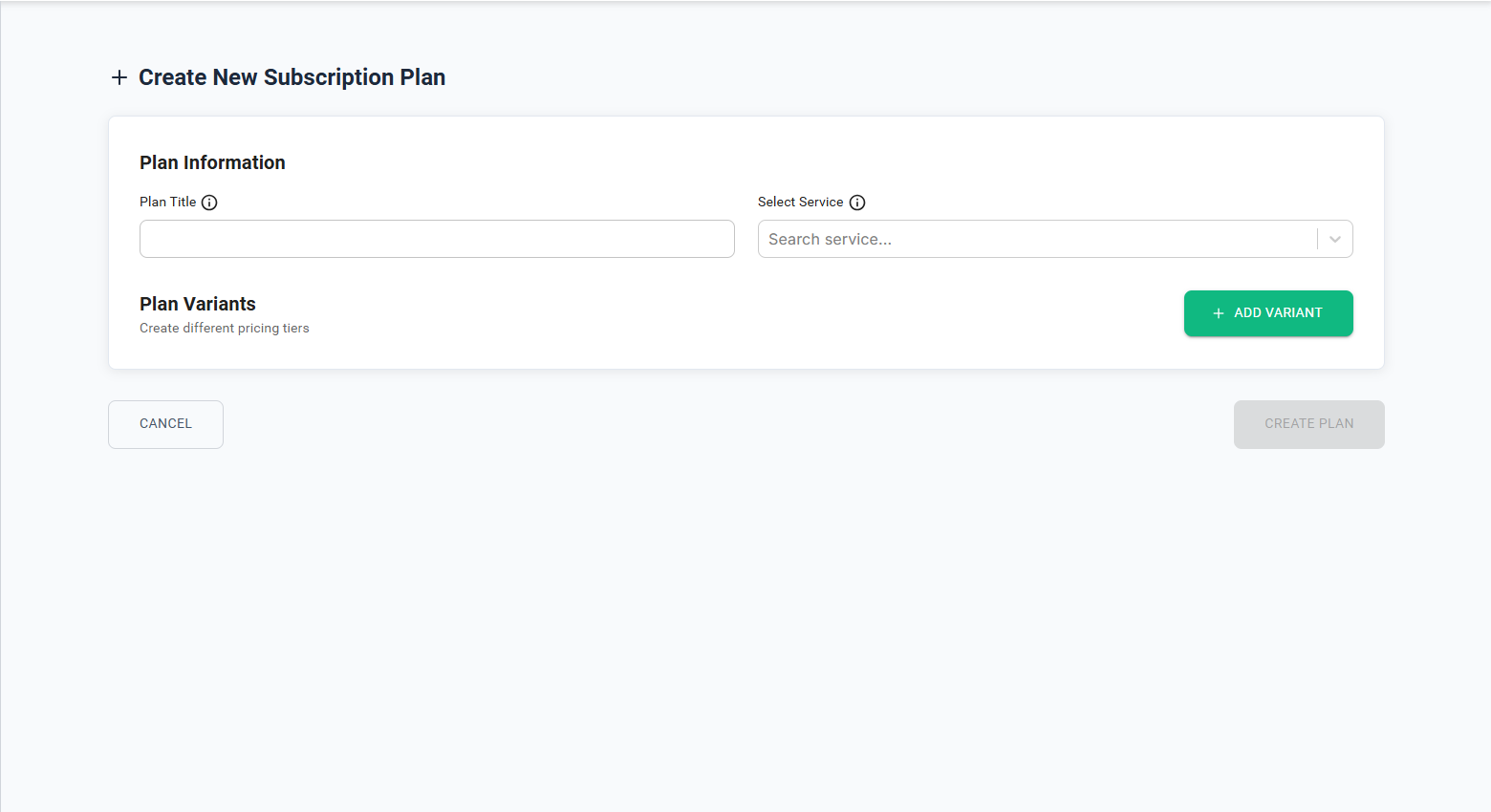
Fill out the Plan Information section:
- Plan Title: Enter a name for your subscription plan.
- Select Service: Choose the service for which this plan applies.
-
Proceed to Plan Variants:
- Click the + Add Variant button to add a pricing tier (example: Silver, Gold, Diamond).
✅ Variant Configuration
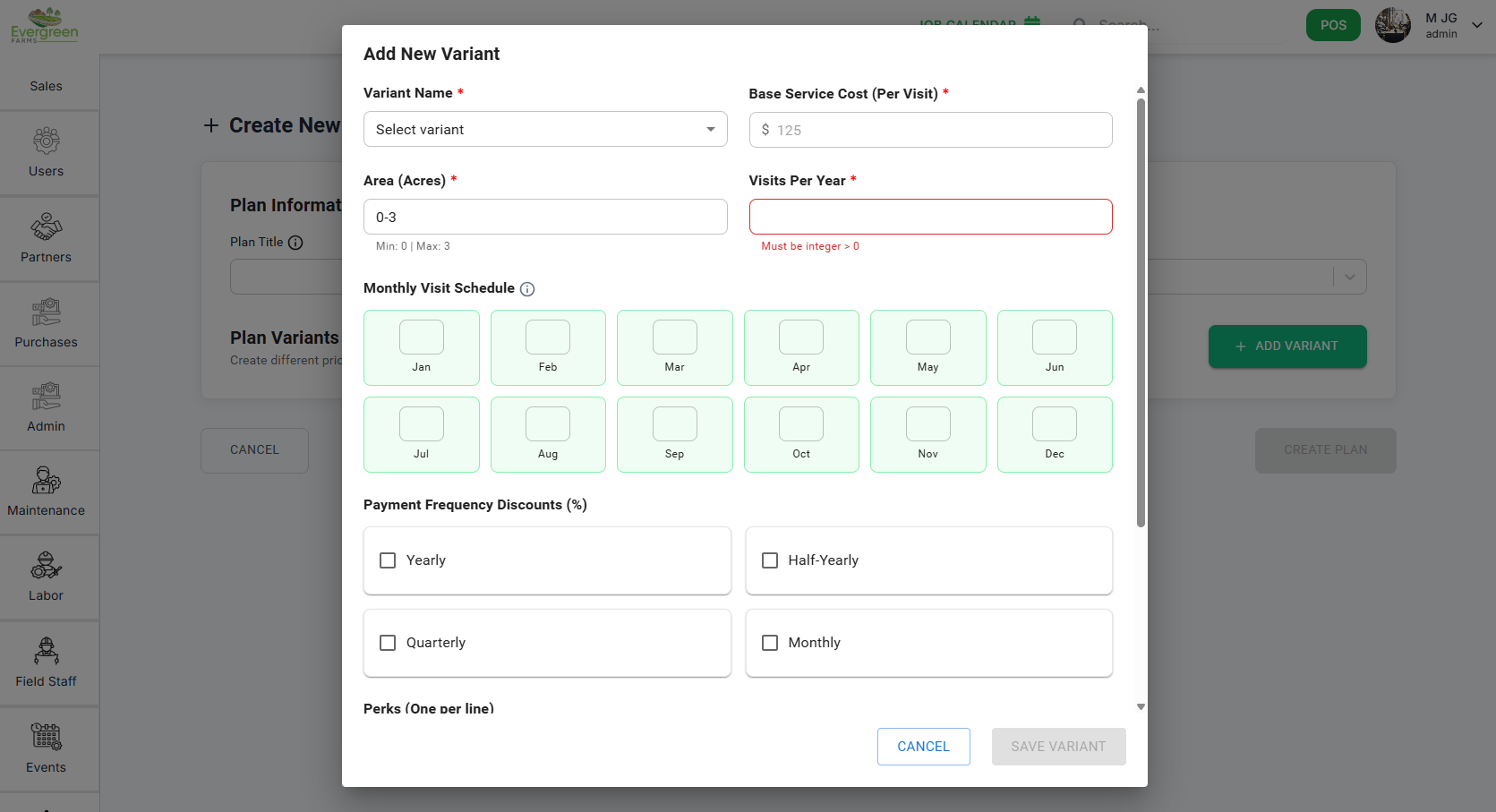
Each variant allows you to create different pricing tiers within one subscription plan. Example: Small Area, Medium Area, Large Area.
- Variant Name: Select or enter the name of the pricing tier.
- Base Service Cost (Per Visit): Enter the cost charged per visit for this variant.
- Area (Acres): Define the land area range (e.g., 0–3 acres).
- Visits Per Year: Set the number of visits included in this plan tier.
- Monthly Visit Schedule: Select the months in which service visits will be performed.
- Payment Frequency Discounts: Optional discounts based on yearly, half-yearly, quarterly, or monthly payments.
- Perks: Add perks or benefits (one per line) included in the plan variant.
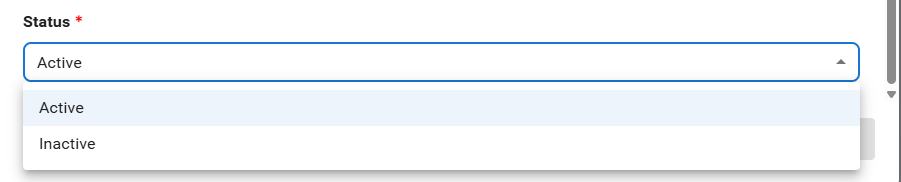
- Status: Set the variant as Active or Inactive.
Saving the Variant
After filling all details, click Save Variant. You can add multiple variants before creating the plan. Finally, click Create Plan to save the complete subscription plan.
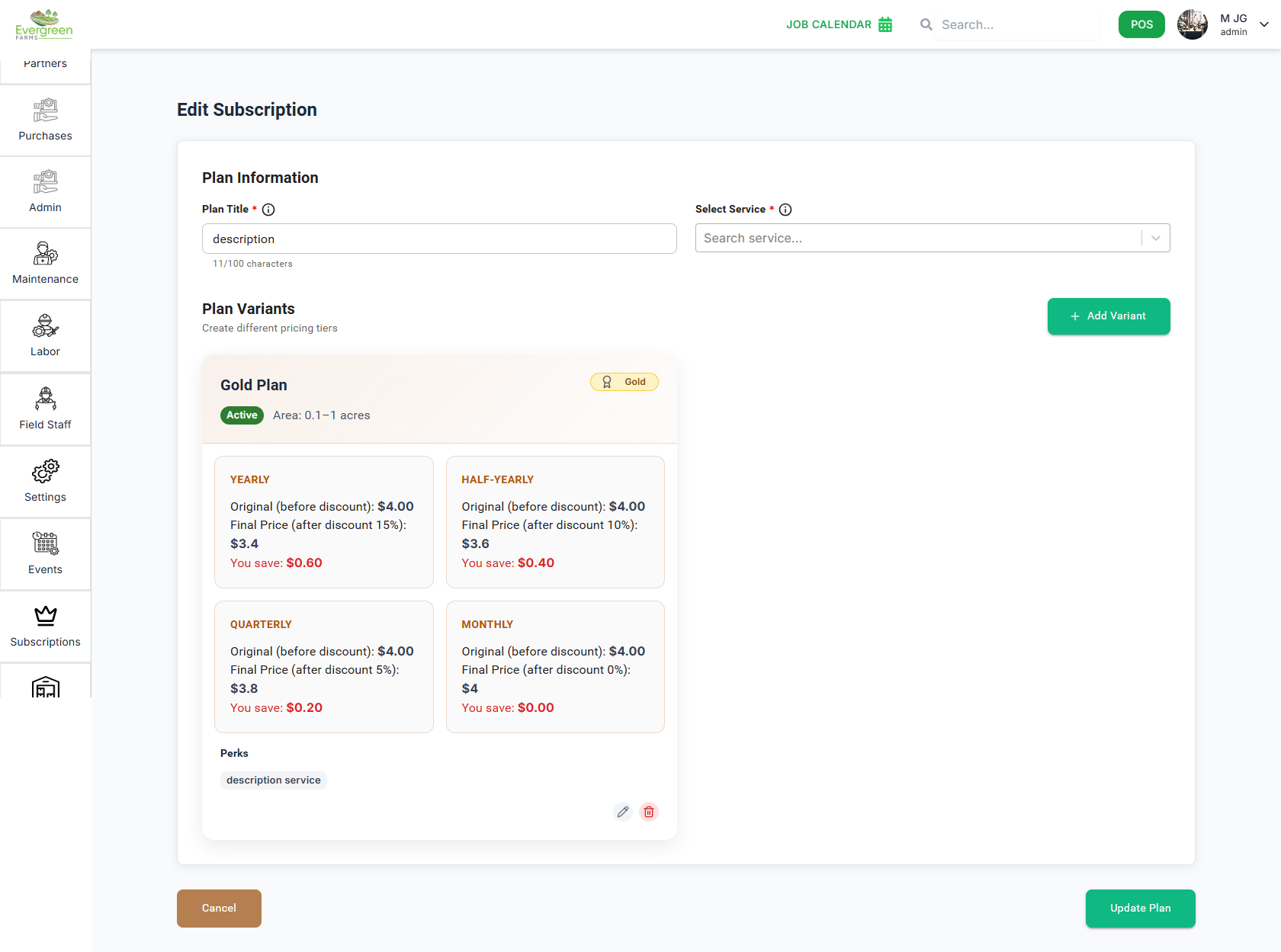
The Edit Subscription Plan page allows you to update an existing plan by changing its title, modifying its service, and managing the associated plan variants. You can easily edit, delete, or add new variants based on your requirements.
Plan Information
- Plan Title: Update the name of the subscription plan directly in the text field.
- Select Service: Replace or update the service linked to this plan using the searchable dropdown.
Plan Variants
Each variant displays the pricing tier of the plan along with area range, perks, and status. You can:
- Edit Variant: Click the edit icon to modify visits per year, acres, pricing, discounts, monthly schedule, and perks.
- Delete Variant: Remove a variant entirely with the delete icon.
- Add Variant: Use the + Add Variant button to include new pricing tiers.
- Variant Name: Select or enter the name of the pricing tier.
- Base Service Cost (Per Visit): Enter the cost charged per visit for this variant.
- Area (Acres): Define the land area range (e.g., 0–3 acres).
- Visits Per Year: Set the number of visits included in this plan tier.
- Monthly Visit Schedule: Select the months in which service visits will be performed.
- Payment Frequency Discounts: Optional discounts based on yearly, half-yearly, quarterly, or monthly payments.
- Perks: Add perks or benefits (one per line) included in the plan variant.
- Status: Set the variant as Active or Inactive.
Save Changes
After making all necessary updates, click the Update Plan button to save your changes. You can also cancel the update using the Cancel button.
Subscribers Management
The Subscribers Management module allows you to efficiently manage your subscribers. This guide covers how to view subscriber details, search for specific subscribers, and filter the list based on subscription status.
The Active Subscriptions page helps you manage and track all ongoing customer subscription plans. You can monitor subscription status, billing cycles, plan variants, and upcoming billing dates in one organized table.
✅ Key Features
- Customer Details: View each subscriber’s name and email.
- Plan & Variant: See which subscription plan and variant (e.g., Silver, Gold, Diamond) the customer is enrolled in.
- Billing Cycle: Identify whether the customer is billed Monthly, Yearly, Half-Yearly, etc.
- Status: Shows whether the subscription is currently active.
- Start Date: Date when the subscription began.
- Next Bill: Shows the upcoming billing date in red for easy visibility.
- Row Actions: Expand the dropdown icon on each row for additional subscriber-specific information.
- Pagination: Scroll through subscribers using page controls at the bottom.
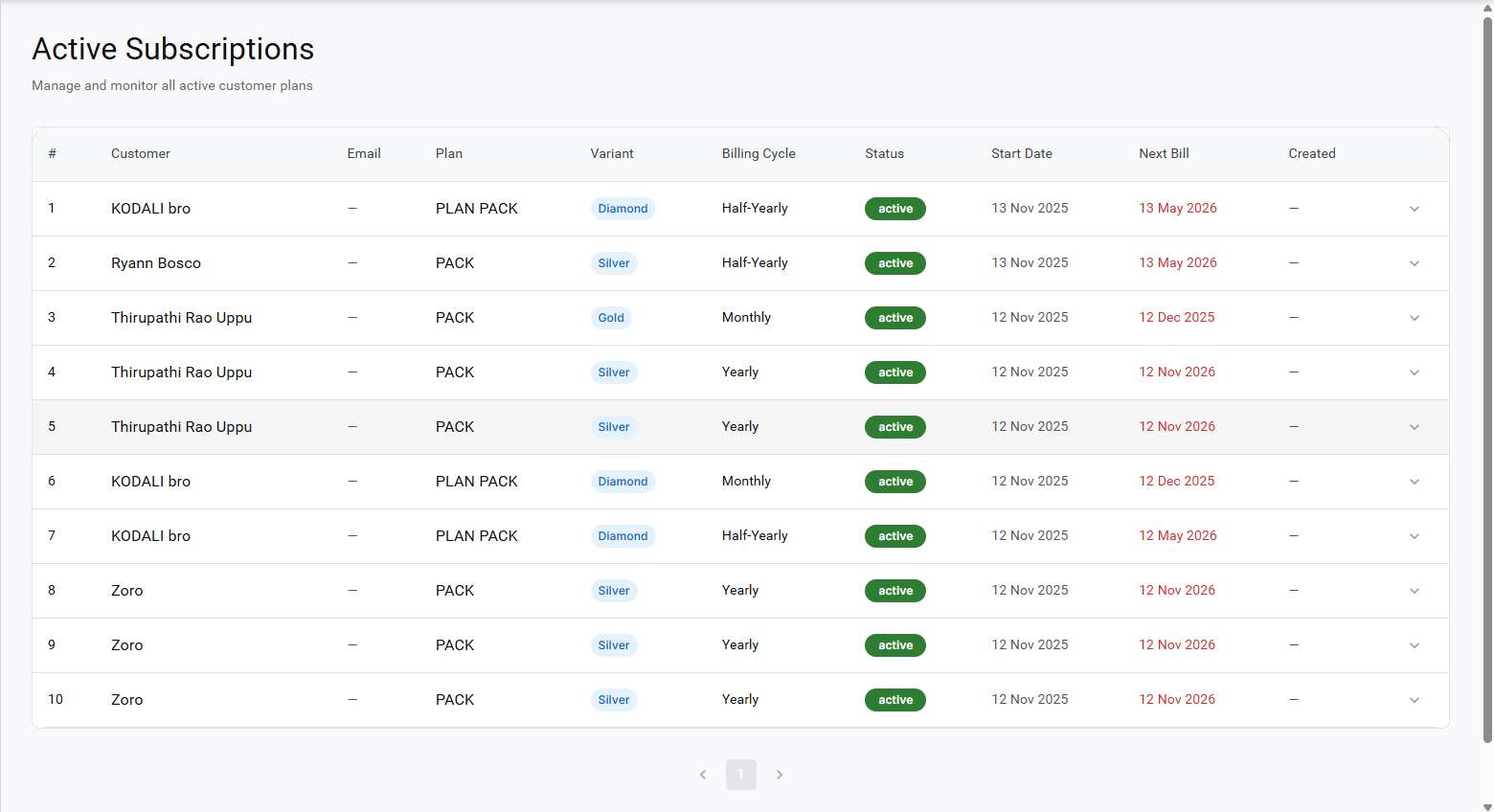
This dashboard ensures you stay updated with customer billing, plan usage, and future renewals, allowing for smooth subscription management.
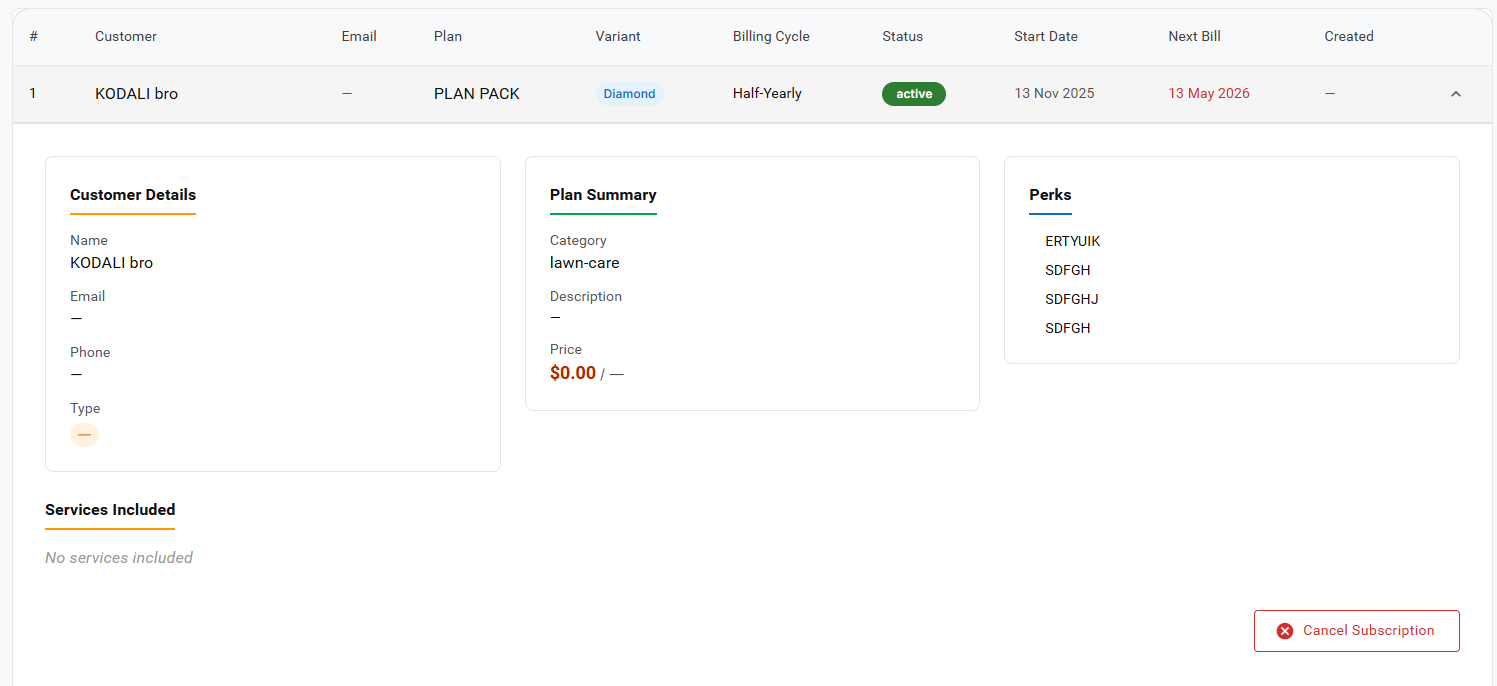
When you click the dropdown icon on any subscription row, the system displays a detailed breakdown of the customer's current plan. This section helps you review customer information, their plan summary, perks, and any included services.
Customer Details
- Name: Shows the subscriber’s full name.
- Email: The customer’s registered email address.
- Phone: Displays the subscriber’s phone number.
- Type: Indicates the customer type (if available).
Plan Summary
- Category: The service group the plan belongs to (e.g., lawn-care).
- Description: Additional details or notes about the plan.
- Price: Displays the plan price and billing frequency.
Perks
Lists all perks or benefits included in this subscription, such as features or service add-ons.
Services Included
Shows services covered under the subscription. If no services are included, it displays “No services included.”
Cancel Subscription
To stop the customer's plan, click the Cancel Subscription button. This action will deactivate the customer’s plan and stop future billing.
Share-Product-Subscribes-plan
The Share-Product-Subscribes-plan module allows you to create and manage subscription plans for your shared products. This guide covers how to navigate the plans dashboard, create new plans, add variants, and edit existing plans.
Key Features
- View available plans to subscribe. When you click the "Subscribe Now" button, an OTP is sent to the email address provided during login. Enter the OTP to verify your identity. After verification, you will be redirected to the payment page to complete the process, or you can choose to copy a link to share with others.